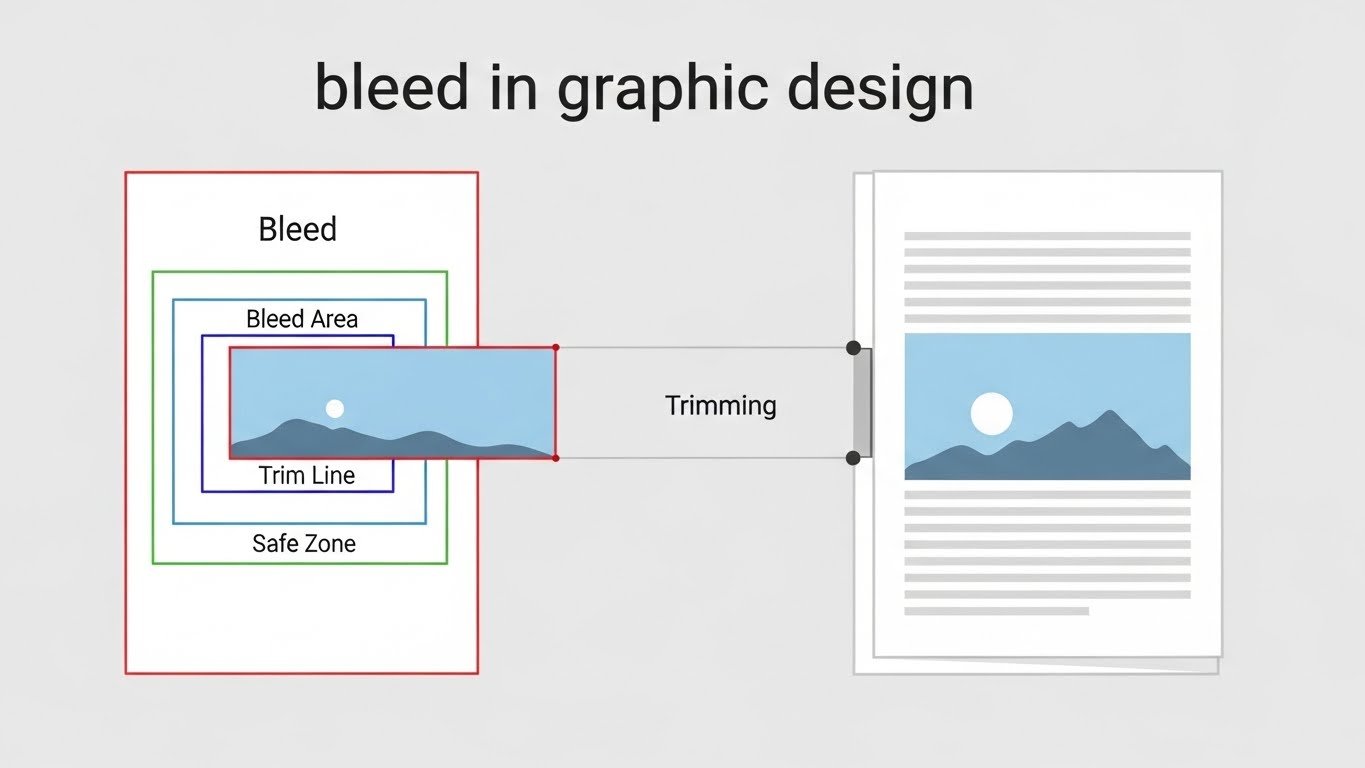
If you’ve ever sent a design to print and received it back with thin white edges you didn’t plan for, you’ve already encountered the importance of bleed. One of the most misunderstood yet critical concepts in print design, bleed separates amateur-looking prints from professional-quality work.
Whether you’re a graphic designer, marketer, or small business owner ordering print materials, understanding what bleed means in graphic design can save you time, money, and frustration. This guide is written to be the most complete, beginner-friendly, and professional explanation available, aligned with how designers and printers actually work in the real world.
Short Answer: What Does Bleed Mean in Graphic Design?
Bleed in graphic design refers to the extra area of a design that extends beyond the final trim edge of a printed page. This extra space ensures that when the paper is cut to size, there are no unwanted white edges, even if the trimming is slightly off.
In simple terms: bleed lets your background colors, images, or graphics run past the edge of the page so the final printed piece looks clean and professional.
What Does Bleed Mean in Graphic Design? (Core Explanation)
At its core, what bleed means in graphic design is preparation for imperfection. Printing and cutting are physical processes, and no trimming machine is accurate down to a fraction of a pixel. Even a tiny shift can expose white paper edges if a design stops exactly at the trim line.
Bleed exists to account for:
- Minor cutting variations
- Paper movement during trimming
- High-speed commercial printing processes
Digital Design vs Print Design Bleed
Bleed is irrelevant for purely digital designs like websites, social media posts, or mobile apps. However, the moment a design is meant for print flyers, posters, brochures, packaging bleed becomes essential.
What Does Bleed Mean in Graphic Design for Printing?
How Printers Trim Pages
Printers print designs on larger sheets of paper and then trim them down to the final size. Because trimming is mechanical, small shifts can occur.
Why Designs Extend Beyond Trim Lines
Designs are intentionally extended beyond the trim line into the bleed area so that:
- Background colors reach the edge
- Full-bleed images don’t leave white borders
- Final output looks precise and polished
Real-World Print Scenarios
- Business cards: Color backgrounds must bleed to avoid white borders
- Brochures: Edge-to-edge images require bleed
- Posters: Large-format trimming increases bleed importance
Why Bleed Matters in Graphic Design
Ignoring bleed is one of the fastest ways to ruin a print job.
Preventing White Edges After Trimming
Without bleed, even a perfect design can look flawed after cutting.
Ensuring Professional Print Quality
Professional designers always include bleed it’s an industry standard.
Cost and Reprint Implications
Print shops may:
- Reject files without bleed
- Charge extra to fix them
- Print as-is, resulting in wasted materials
Who Needs to Understand Bleed in Graphic Design
Bleed isn’t just for designers.
- Graphic designers: Essential print skill
- Print shops: Require bleed-ready files
- Marketing teams: Ensure campaign materials print correctly
- Small business owners: Avoid costly reprints and delays
Common Questions People Ask About Bleed (PAA Section)
- Is bleed required for all print designs?
- How much bleed do printers usually need?
- Can I print without bleed?
- Does bleed increase file size?
- Is bleed used in digital graphics?
Step-by-Step: How to Add Bleed in Graphic Design Files
Step 1: Check Printer Bleed Requirements
Always confirm bleed specs with your printer. Don’t assume.
Step 2: Set Bleed in Design Software
Most professional tools allow you to define bleed values during setup.
Step 3: Extend Background Elements
Background colors, images, and patterns must extend into the bleed area.
Step 4: Keep Text Inside the Safe Zone
Logos and text should stay well away from trim lines.
Step 5: Export with Bleed and Crop Marks
Export as a print-ready PDF with bleed included.
How to Add Bleed in Graphic Design Software
Adobe Illustrator
- Set bleed in Document Setup
- Extend artwork beyond trim
Adobe InDesign
- Add bleed when creating the document
- Export PDF with bleed and crop marks
Adobe Photoshop
- Increase canvas size
- Extend background layers manually
Canva (Print Bleed Setup)
- Enable “Show print bleed”
- Export as PDF Print with bleed enabled
Bleed vs Trim vs Margin (Comparison Table)
| Element | Purpose | Where Content Goes | Common Mistakes |
|---|---|---|---|
| Bleed | Prevent white edges | Backgrounds extend here | Forgetting to extend images |
| Trim Line | Final cut size | No critical content | Designing to trim edge |
| Margin / Safe Zone | Protect content | Text & logos stay here | Placing text too close |
Standard Bleed Sizes in Graphic Design
US Standard Bleed Size
-
⅛ inch (0.125 in) on all sides
International Bleed Sizes
-
Usually 3 mm
Printer-Specific Variations
Some printers require more for large-format or specialty prints.
What Is the Standard Bleed Size in Graphic Design?
Most professionals use ⅛ inch bleed because it balances safety and efficiency. In metric systems, 3 mm bleed achieves the same goal.
Common Bleed Mistakes in Graphic Design
- Not extending background images
- Placing text inside the bleed area
- Assuming printers will “fix it”
- Confusing bleed with margins
Bleed in Digital vs Print Graphic Design
Why Bleed Is Irrelevant for Web Graphics
Screens don’t get trimmed bleed is unnecessary.
When Bleed Still Matters for PDFs
Print-ready PDFs still require bleed.
Packaging and Large-Format Printing
Packaging, banners, and signage often need extra bleed.
FAQs: What Does Bleed Mean in Graphic Design
What does bleed mean in graphic design exactly?
It’s the extra design area beyond the trim edge to prevent white borders.
Is bleed necessary for small prints like business cards?
Yes especially for edge-to-edge designs.
How much bleed should I add to my design?
Typically ⅛ inch (3 mm), unless specified otherwise.
What happens if I don’t add bleed?
Your print may show white edges or be rejected.
Does Canva support bleed in graphic design?
Yes, through PDF Print export options.
Is bleed the same for all printers?
No always check printer guidelines.
Can bleed affect color accuracy?
No, but poor setup can cause visible edges.
Do logos need bleed?
Only if they touch the edge of the design.
Conclusion: Understanding What Bleed Means in Graphic Design
Understanding what bleed means in graphic design is non-negotiable for professional print work. Bleed exists to protect your design from trimming errors, maintain visual quality, and meet industry standards.
Best practice: Always check printer specifications, set bleed correctly, and keep critical elements inside safe zones. A few extra millimeters can be the difference between a flawless print and an expensive mistake. For more information or to hire a graphic designer, visit Incline Solution now!



Leave a comment